

How to transfer video or images from a camcorder with a hard disk drive
Select the appropriate method to transfer video or images from a camcorder with a hard disk drive:
Transfer using Picture Motion Browser
To learn how to transfer your videos to your computer using Picture Motion Browser software bundled with your camcorder, please click the below image and then click the link corresponding to your camcorder type and software version.


How to transfer video or images from a camcorder with a hard disk drive using a USB connection
IMPORTANT : Movie player applications must support mpeg 2 playback to open these files properly. Refer to the software manufacturer for additional information and available updates.
- Turn on the computer.
- Make sure the camcorder is turned off.
- Connect the camcorder to the computer using the supplied USB cable.
- Plug the AC power adapter into an electrical wall outlet and then connect it to the camcorder.
- Open the LCD screen on the camcorder.
- Turn on the camcorder.
- The USB SELECT screen will be displayed on the LCD; touch the HDD icon.
- Open the My Computer window on the computer.
- In the My Computer window,
double-click the icon that
represents the camcorder and then navigate through the folder structure
to locate the video you want to transfer.
NOTES: The camcorder will be listed in the My Computer window as an additional hard drive. - Click to select the video or
image files you want to
transfer.
NOTES: If your are using a High Definition Handycam® Camcorder, Sony recommends copying and pasting the AVCHD folder to the hard drive of the computer before accessing its contents.
- Type CTRL+C to copy the files.
- Click on the computer folder to which you want to copy the video or still image files.
- Type CTRL+V to paste the file into the computer folder.
How to transfer video or images from a camcorder with a hard disk drive using Audio/Video (A/V) cables
IMPORTANT
The computer must have standard Audio/Video (A/V) RCA input jacks and
compatible video capture software to complete this procedure.
Because there are many different video capture applications on the
market and we cannot reasonably know which video capture software you
are using, Sony is unable to provide specific instructions or support
for software we do not manufacture. However, many video capture
applications have detailed help files, including specific instructions
about capturing and importing video from a camcorder to a computer. The
help files should be available in the Help menu of the video capture
software or in a separate file on the software disc. If you cannot find
instructions in the help file or on the disc included with your
software, consult the software manufacturer for more detailed support
information.
- Connect an A/V cable to the
A/V output jack of the
camcorder.
NOTES:
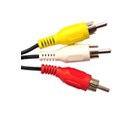
If your camcorder has standard A/V RCA output jacks, use standard A/V cables for the connection.
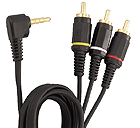
If your camcorder has a mini A/V output jack, use an A/V cable with a mini connection on one end.
- Connect the other end of the A/V cable to the A/V input jack on the computer.
- Turn on the camcorder to the PLAYBACK mode.
- Cue the video in the camcorder to the beginning of the video footage to be transferred.
- Turn on the computer.
- Start the video capture software.
- Begin playing the video in the camcorder.
- Begin importing the video with the video capture software.
Last Updated 21 June 2010